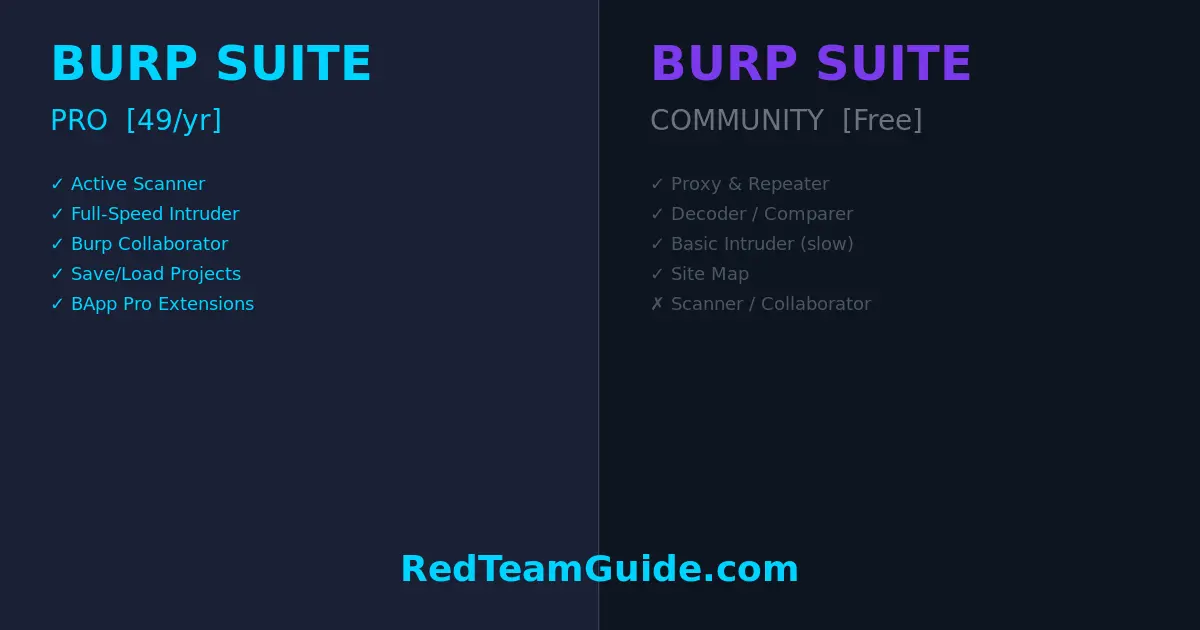
Bottom line: If you’re doing professional web app pentests or bug bounty hunting seriously, Burp Suite Pro pays for itself after one engagement. If you’re learning or doing CTFs, Community Edition is genuinely sufficient — for now.
What Is Burp Suite?
Burp Suite is PortSwigger’s web application security testing platform. It’s been the industry standard for web app pentesting for over a decade, and for good reason — it intercepts, manipulates, and replays HTTP/S traffic with surgical precision. Whether you’re hunting for SQLi, IDOR, XSS, or chaining together complex multi-step attack sequences, Burp is the tool you’ll reach for first.
There are two tiers that matter for individual practitioners: Community Edition (free) and Professional ($449/year). Let’s break down exactly what you get — and don’t get — at each level.
Burp Suite Community Edition: What You Actually Get
Don’t undersell Community Edition. It’s a legitimately powerful tool:
- Proxy — Intercept and modify HTTP/S requests in real time. This is Burp’s core, and it’s fully functional in the free tier.
- Repeater — Manually resend and tweak requests. Invaluable for exploiting and confirming vulnerabilities.
- Decoder — Encode/decode data across Base64, URL encoding, HTML entities, and more.
- Comparer — Diff two requests or responses side by side.
- Sequencer — Analyze randomness in tokens (session IDs, CSRF tokens).
- Target / Site Map — Passive crawl of everything you’ve visited through the proxy.
- Basic Intruder — Automated fuzzer, but with a critical limitation (more on this below).
For learning, CTF challenges, and personal projects, Community Edition is fully capable. If you’re working through PortSwigger’s own Web Security Academy (which you should be), Community Edition handles every lab.
Burp Suite Pro: What You’re Actually Paying For
At $449/year, Pro adds layers that genuinely change the pace and depth of professional work:
1. Active Scanner
The scanner is the headline feature. It automatically crawls and audits web applications for hundreds of vulnerability classes — SQLi, XSS, XXE, SSRF, path traversal, insecure deserialization, and more. It’s not a replacement for manual testing, but it functions as a tireless first-pass that flags obvious issues and surfaces attack surface you might miss manually.
In a professional engagement with a large target, the scanner alone can save hours.
2. Intruder — Full Speed
This is where Community Edition gets deliberately hobbled. Community Intruder is rate-limited — it runs slow enough to be frustrating for any real fuzzing work. Pro removes that throttle entirely. When you’re brute-forcing login forms, fuzzing parameters for injection points, or iterating through a wordlist, the difference between Community and Pro Intruder is the difference between waiting 20 minutes and waiting 90 seconds.
3. Burp Collaborator
An out-of-band interaction server hosted by PortSwigger. Essential for detecting blind SSRF, blind SQLi via DNS exfiltration, blind XSS, and similar vulnerabilities where the response doesn’t directly reveal exploitation. Without Collaborator, you’re flying blind on a significant class of bugs. You can self-host an alternative, but Collaborator is battle-tested and seamless.
4. Save and Restore Project State
Community Edition can’t save project state. Every time you close Burp, your history, notes, and scope are gone. Pro’s project files let you pause an engagement, come back tomorrow, and pick up exactly where you left off. For multi-day engagements, this isn’t a nice-to-have — it’s a requirement.
5. BApp Store Extensions (Full Access)
Both tiers can install extensions from the BApp Store, but Pro unlocks several that require a Pro license. Notable examples: Autorize (authorization testing), ActiveScan++ (enhanced scanner checks), Turbo Intruder (high-speed Python-scriptable fuzzer), and Logger++ (advanced request logging). The extension ecosystem is a significant force multiplier.
6. Scheduled Tasks and Reporting
Pro includes built-in reporting generation (HTML/XML) for findings — useful when you need to hand deliverables to clients without spending hours formatting a report manually. It also supports scan scheduling.
When Community Edition Is Enough
Be honest with yourself:
- Learning and certification prep (OSCP, eWPT, CEH) — Community Edition covers everything you need.
- CTF competitions — All the manual tooling you need is there.
- Personal lab environments — Proxy + Repeater handles 90% of your learning workflow.
- Occasional one-off testing — If you’re not doing web app testing regularly, don’t pay for Pro.
If you’re a student or someone building skills on your own time, save the $449. Pair Community Edition with OWASP ZAP (covered below) and you have a capable free stack.
When Pro Pays for Itself
- Professional penetration testers — If you bill even a single web app engagement per year at market rates ($3,000–$15,000+), Pro costs less than 15% of your lowest-end engagement fee.
- Bug bounty hunters going for volume — The scanner and full-speed Intruder increase your throughput. More surface covered = more bugs found = more payouts.
- Red team operators — Collaborator and advanced extension support are essential for realistic adversary simulation.
- Anyone doing multi-day engagements — Project state save/restore is non-negotiable.
The calculus is simple: one billable day of web app testing pays for a year of Burp Pro. If you’re doing this professionally, there’s no serious argument against it.
For deeper context on web application attack methodology — the kind of knowledge that makes your Burp usage actually effective — these two books remain essential reading:
- The Web Application Hacker’s Handbook — The foundational text. Dense, practical, and still relevant despite its age.
- Real-World Bug Hunting — Case studies from actual bug bounty reports. Shows you how professionals think through vulnerabilities.
Price Breakdown
| Tier | Price | Who It’s For |
|---|---|---|
| Community Edition | Free | Students, learners, CTF players |
| Professional | $449/year (~$37/month) | Working pentesters, bug bounty hunters |
| Enterprise | Custom pricing | Organizations running automated scans at scale |
Team pricing exists for Enterprise but isn’t public — you’ll need to contact PortSwigger for quotes. For individual practitioners, it’s Community or Pro. There’s no meaningful middle ground.
The Free Alternative: OWASP ZAP
OWASP ZAP (Zed Attack Proxy) is the closest free alternative to Burp Pro. It has an active scanner, automated crawling, and a solid extension ecosystem. It’s open source, community-maintained, and has no artificial rate limits.
The honest take: ZAP is a capable tool, but Burp’s UX is cleaner, its manual testing workflow is tighter, and the professional security community runs on Burp. If you’re interviewing for pentesting roles, “I use ZAP” is fine — “I use Burp Pro” signals you’re operating at a professional level.
ZAP is worth having as a secondary tool regardless of which Burp tier you’re on. Running both against the same target sometimes catches different issues.
Verdict
If you’re getting paid to test web applications: buy Pro. The scanner, Collaborator, full-speed Intruder, and project state alone justify the cost. You’ll recoup $449 faster than you think.
If you’re learning or doing this as a hobby: Community Edition is fine. Work through the PortSwigger Web Security Academy, get comfortable with the proxy and Repeater workflow, and upgrade when your work demands it.
Don’t overthink this. The tool doesn’t make the tester — but having the right tool in a professional context matters. Pro removes friction. That’s worth $449/year.
Disclosure: This article contains affiliate links. If you purchase through these links, RedTeamGuide.com earns a small commission at no additional cost to you. We only link to resources we’d recommend regardless.