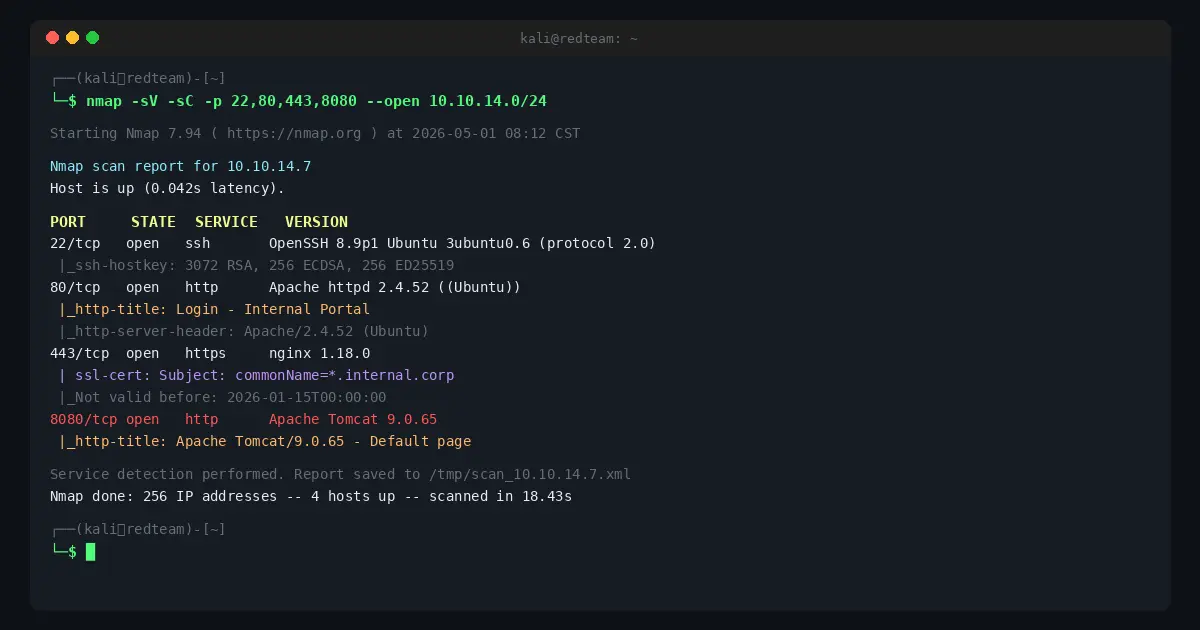
You don’t memorize Nmap. Nobody does. You keep a cheat sheet, you use it constantly, and eventually the important stuff sticks.
This is that cheat sheet — updated for 2026, organized by what you actually do on engagements, not alphabetically by flag name. Covers everything from basic discovery to NSE scripting to firewall evasion. If it’s not here, you probably don’t need it in the field.
Target Specification
These go at the end of any Nmap command. Mix and match as needed.
# Single IP
nmap 192.168.1.1

# CIDR range
nmap 192.168.1.0/24

# IP range (dash notation)
nmap 192.168.1.1-254

# Multiple targets
nmap 192.168.1.1 10.0.0.1 172.16.0.1

# From file
nmap -iL targets.txt

# Exclude hosts
nmap 192.168.1.0/24 --exclude 192.168.1.1,192.168.1.254

# Exclude file
nmap 192.168.1.0/24 --excludefile exclude.txt

# Random targets (useful for external recon)
nmap -iR 100
Host Discovery
Before port scanning, figure out what’s alive. Saves time on large networks.
# Ping scan only (no port scan)
nmap -sn 192.168.1.0/24

# ARP discovery (local network, requires root)
nmap -PR 192.168.1.0/24

# TCP SYN ping (useful when ICMP is blocked)
nmap -PS22,80,443 192.168.1.0/24

# TCP ACK ping
nmap -PA80,443 192.168.1.0/24

# UDP ping
nmap -PU53,161 192.168.1.0/24

# ICMP echo ping
nmap -PE 192.168.1.0/24

# Disable host discovery — treat all targets as up
nmap -Pn 192.168.1.1

# List targets without scanning (sanity check)
nmap -sL 192.168.1.0/24
-Pn is your friend against hosts that drop pings. Most production servers do.
Scan Types
The Big Four
# SYN scan — default, stealthy, requires root
nmap -sS 192.168.1.1

# TCP connect scan — no root needed, louder
nmap -sT 192.168.1.1

# UDP scan — slow, worth it for DNS/SNMP/TFTP
nmap -sU 192.168.1.1

# Combined TCP + UDP
nmap -sS -sU 192.168.1.1
Specialty Scans
# NULL scan (no flags) — evades some stateless firewalls
nmap -sN 192.168.1.1

# FIN scan
nmap -sF 192.168.1.1

# Xmas scan (FIN+PSH+URG)
nmap -sX 192.168.1.1

# ACK scan — map firewall rules, not open ports
nmap -sA 192.168.1.1

# Window scan — ACK variant, sometimes finds open ports
nmap -sW 192.168.1.1

# Maimon scan (FIN+ACK)
nmap -sM 192.168.1.1

# IP protocol scan
nmap -sO 192.168.1.1
Note on NULL/FIN/Xmas: These don’t work reliably against Windows targets. Windows sends RST for all closed and open ports for these scan types.
Port Specification
# Single port
nmap -p 80 192.168.1.1

# Multiple ports
nmap -p 22,80,443,8080 192.168.1.1

# Port range
nmap -p 1-1000 192.168.1.1

# All 65535 ports
nmap -p- 192.168.1.1

# Top N most common ports
nmap --top-ports 100 192.168.1.1
nmap --top-ports 1000 192.168.1.1

# Fast scan (top 100 ports)
nmap -F 192.168.1.1

# UDP ports
nmap -sU -p U:53,161,123 192.168.1.1

# Mixed TCP/UDP
nmap -p T:80,443,U:53,161 192.168.1.1

# Ports by name
nmap -p http,https,ssh 192.168.1.1
For internal engagements: -p- is thorough but slow. --top-ports 1000 catches ~99% of what matters.
Service and Version Detection
# Service version detection
nmap -sV 192.168.1.1

# Intensity levels (0=lightest, 9=aggressive)
nmap -sV --version-intensity 5 192.168.1.1

# Aggressive version detection (noisier)
nmap -sV --version-all 192.168.1.1

# Light version detection
nmap -sV --version-light 192.168.1.1

# OS detection (requires root, needs open+closed port)
nmap -O 192.168.1.1

# Aggressive OS detection guessing
nmap -O --osscan-guess 192.168.1.1

# Everything at once
nmap -A 192.168.1.1
-A = -sV -sC -O --traceroute. Good for quick recon on a single host. Too noisy for stealth work.
NSE Scripts
The Nmap Scripting Engine is where Nmap becomes a recon powerhouse. Scripts live in /usr/share/nmap/scripts/.
Script Categories
# Default scripts (safe, widely useful)
nmap -sC 192.168.1.1

# Run specific script
nmap --script=http-title 192.168.1.1

# Multiple scripts
nmap --script=http-title,http-headers 192.168.1.1

# Wildcard by name
nmap --script=http-* 192.168.1.1

# By category
nmap --script=vuln 192.168.1.1
nmap --script=auth 192.168.1.1
nmap --script=discovery 192.168.1.1
nmap --script=safe 192.168.1.1
nmap --script=intrusive 192.168.1.1

# Multiple categories
nmap --script="default and safe" 192.168.1.1
nmap --script="vuln or exploit" 192.168.1.1
nmap --script="not intrusive" 192.168.1.1

# Pass arguments to scripts
nmap --script=http-brute --script-args http-brute.path=/login 192.168.1.1

# Update script database
nmap --script-updatedb
High-Value Scripts by Use Case
SMB Enumeration
nmap -p 445 --script=smb-enum-shares,smb-enum-users,smb-os-discovery 192.168.1.1
nmap -p 445 --script=smb-vuln-ms17-010 192.168.1.1   # EternalBlue
nmap -p 445 --script=smb-vuln-ms08-067 192.168.1.1
nmap -p 445 --script=smb2-security-mode 192.168.1.1
HTTP Enumeration
nmap -p 80,443 --script=http-title,http-headers,http-methods 192.168.1.1
nmap -p 80,443 --script=http-robots.txt 192.168.1.1
nmap -p 80,443 --script=http-sitemap-generator 192.168.1.1
nmap -p 80,443 --script=http-auth-finder 192.168.1.1
nmap -p 80,443 --script=http-vhosts --script-args http-vhosts.domain=example.com 192.168.1.1
SSL/TLS
nmap -p 443 --script=ssl-cert,ssl-enum-ciphers 192.168.1.1
nmap -p 443 --script=ssl-heartbleed 192.168.1.1         # Heartbleed
nmap -p 443 --script=ssl-poodle 192.168.1.1             # POODLE
nmap -p 443 --script=sslv2 192.168.1.1                  # SSLv2
DNS
nmap -p 53 --script=dns-zone-transfer --script-args dns-zone-transfer.domain=example.com 192.168.1.1
nmap -p 53 --script=dns-brute --script-args dns-brute.domain=example.com 192.168.1.1
SNMP
nmap -sU -p 161 --script=snmp-info,snmp-interfaces,snmp-processes 192.168.1.1
nmap -sU -p 161 --script=snmp-brute 192.168.1.1
FTP
nmap -p 21 --script=ftp-anon,ftp-bounce,ftp-brute 192.168.1.1
SSH
nmap -p 22 --script=ssh-auth-methods,ssh-hostkey 192.168.1.1
nmap -p 22 --script=ssh-brute 192.168.1.1
Database
nmap -p 3306 --script=mysql-info,mysql-databases,mysql-empty-password 192.168.1.1
nmap -p 1433 --script=ms-sql-info,ms-sql-empty-password 192.168.1.1
nmap -p 5432 --script=pgsql-brute 192.168.1.1
nmap -p 27017 --script=mongodb-info 192.168.1.1
nmap -p 6379 --script=redis-info 192.168.1.1
Timing and Performance
Speed vs. stealth tradeoff. On an engagement, know which you’re optimizing for.
# T0 — Paranoid (5 min/probe, IDS evasion)
nmap -T0 192.168.1.1

# T1 — Sneaky (15 sec delay between probes)
nmap -T1 192.168.1.1

# T2 — Polite (400ms delay)
nmap -T2 192.168.1.1

# T3 — Normal (default)
nmap -T3 192.168.1.1

# T4 — Aggressive (recommended for CTFs and fast internals)
nmap -T4 192.168.1.1

# T5 — Insane (may miss results on slow networks)
nmap -T5 192.168.1.1

# Fine-grained control
nmap --min-rate 100 192.168.1.0/24          # minimum 100 packets/sec
nmap --max-rate 500 192.168.1.0/24          # cap at 500 packets/sec
nmap --min-parallelism 10 192.168.1.0/24    # min concurrent probes
nmap --max-parallelism 100 192.168.1.0/24   # max concurrent probes
nmap --host-timeout 30m 192.168.1.0/24      # skip slow hosts after 30min
nmap --scan-delay 1s 192.168.1.1            # wait 1s between probes
nmap --max-retries 1 192.168.1.1            # reduce retries
Lab tip: Run Nmap in a cloud VPS to reduce round-trip latency on external targets. Vultr and DigitalOcean both offer $5-6/month instances in multiple regions — useful when you need low-latency proximity to a target or want to avoid flagging your home IP.
Firewall and IDS Evasion
Use these carefully. On an authorized engagement, document what evasion you’re using.
Fragmentation
# Fragment packets (8-byte fragments)
nmap -f 192.168.1.1

# Double fragment (16-byte)
nmap -ff 192.168.1.1

# Custom MTU (must be multiple of 8)
nmap --mtu 24 192.168.1.1
Decoys
# Spoof scan with decoy IPs (ME = your real IP)
nmap -D RND:5 192.168.1.1              # 5 random decoys
nmap -D 10.0.0.1,10.0.0.2,ME 192.168.1.1

# Random source ports
nmap --source-port 53 192.168.1.1      # looks like DNS traffic
nmap --source-port 443 192.168.1.1
Timing
# Slow scan to evade rate-based detection
nmap -T1 --scan-delay 5s 192.168.1.1

# Randomize target order (less pattern-obvious)
nmap --randomize-hosts 192.168.1.0/24
Spoofing
# Spoof source IP (you won't get responses — use with idle scan)
nmap -S 192.168.1.100 -e eth0 192.168.1.1

# Spoof MAC address
nmap --spoof-mac 0 192.168.1.1            # random MAC
nmap --spoof-mac Apple 192.168.1.1        # vendor prefix
nmap --spoof-mac 00:11:22:33:44:55 192.168.1.1

# Append random data to packets
nmap --data-length 25 192.168.1.1
Idle/Zombie Scan
The quiet option — bounce packets through a zombie host. The zombie needs to be idle with predictable IP ID increments.
# Find a zombie first
nmap -O -v --osscan-guess 192.168.1.50

# Idle scan through zombie
nmap -sI 192.168.1.50 192.168.1.1
nmap -sI 192.168.1.50:80 192.168.1.1    # specify zombie port
Output Formats
Always save output. You’ll want it later for reporting, diffing, and not re-scanning.
# Normal output
nmap -oN scan.txt 192.168.1.1

# XML output (parseable, import to Metasploit/Faraday)
nmap -oX scan.xml 192.168.1.1

# Grepable output (one host per line)
nmap -oG scan.gnmap 192.168.1.1

# All three formats at once
nmap -oA scan 192.168.1.1    # creates scan.nmap, scan.xml, scan.gnmap

# Script kiddie (leet)
nmap -oS scan.txt 192.168.1.1    # don't actually use this

# Verbose output
nmap -v 192.168.1.1
nmap -vv 192.168.1.1

# Debug output
nmap -d 192.168.1.1
nmap -dd 192.168.1.1

# Reason for port state
nmap --reason 192.168.1.1

# Open ports only
nmap --open 192.168.1.1

# No DNS resolution (faster)
nmap -n 192.168.1.1

# Always resolve DNS
nmap -R 192.168.1.1

# Packet trace
nmap --packet-trace 192.168.1.1

# Resume interrupted scan
nmap --resume scan.gnmap
Useful Combinations
These are the combos that actually show up in engagement notes.
Quick Internal Sweep
nmap -sn -PE -PP -PM -PS21,22,23,25,80,443,3389 -PU53,161 192.168.1.0/24 -oG hosts-up.gnmap
Full TCP Port Scan + Version
nmap -sS -sV -p- --open -T4 -oA full-tcp 192.168.1.1
Top 1000 Ports with Default Scripts
nmap -sS -sC -sV --top-ports 1000 -T4 -oA top1000 192.168.1.1
Comprehensive Single Host
nmap -A -p- --open -T4 --reason -oA full-host 192.168.1.1
Vulnerability Scan
nmap -sV --script=vuln -p- -T4 -oA vuln-scan 192.168.1.1
SMB Full Enum
nmap -p 445 --script=smb-enum-shares,smb-enum-users,smb-enum-groups,smb-os-discovery,smb-security-mode,smb-vuln-ms17-010 -oA smb-enum 192.168.1.1
Web Server Recon
nmap -p 80,443,8080,8443,8888 --script=http-title,http-headers,http-methods,http-robots.txt,http-auth-finder -sV -oA web-recon 192.168.1.0/24
UDP Top 20 (Fast)
nmap -sU --top-ports 20 -T4 --open -oA udp-top20 192.168.1.1
Stealth External Scan
nmap -sS -T2 -f --data-length 25 --randomize-hosts -p 22,80,443 --open -oA stealth-external targets.txt
Parsing Output
Getting data out of Nmap results without re-scanning.
# Extract open ports from grepable output
grep 'open' scan.gnmap | awk '{print $2}' | sort -u

# Extract IPs with specific port open
grep '80/open' scan.gnmap | awk '{print $2}'

# Pull all open ports from grepable for masscan/follow-up
grep -oP '\d+/open' scan.gnmap | cut -d/ -f1 | sort -un | tr '\n' ','

# Parse XML with Python
python3 -c "
import xml.etree.ElementTree as ET
tree = ET.parse('scan.xml')
for host in tree.findall('.//host'):
    ip = host.find('address').get('addr')
    for port in host.findall('.//port[@protocol=\"tcp\"]'):
        state = port.find('state').get('state')
        if state == 'open':
            print(f'{ip}:{port.get(\"portid\")}')
"
Nmap + Metasploit
Nmap XML feeds directly into Metasploit’s database.
# Import scan into Metasploit DB
msf> db_import /path/to/scan.xml

# Run Nmap from within Metasploit
msf> db_nmap -sS -sV -p- 192.168.1.1

# View hosts
msf> hosts

# View services
msf> services
msf> services -p 445
Quick Reference Card
| Task | Command |
|---|---|
| Live host discovery | nmap -sn 192.168.1.0/24 |
| SYN scan top 1000 | nmap -sS 192.168.1.1 |
| All 65535 ports | nmap -p- 192.168.1.1 |
| Version detection | nmap -sV 192.168.1.1 |
| Default NSE scripts | nmap -sC 192.168.1.1 |
| OS detection | nmap -O 192.168.1.1 |
| Aggressive full scan | nmap -A 192.168.1.1 |
| Vuln scan | nmap --script=vuln 192.168.1.1 |
| UDP scan | nmap -sU 192.168.1.1 |
| Save all output | nmap -oA output 192.168.1.1 |
| Open ports only | nmap --open 192.168.1.1 |
| No ping | nmap -Pn 192.168.1.1 |
| Fast (T4) | nmap -T4 192.168.1.1 |
| Fragment packets | nmap -f 192.168.1.1 |
Nmap vs. Alternatives
Nmap is the standard, but it’s not always the fastest tool for every job.
| Tool | Best For |
|---|---|
| Nmap | Comprehensive scanning, NSE scripts, trusted results |
| Masscan | High-speed port discovery across huge ranges (millions of IPs) |
| Rustscan | Fast port discovery → auto-pipes to Nmap for service detection |
| Zmap | Single-packet internet-wide surveys |
| Shodan | Passive recon without touching target |
Practical workflow: Masscan or Rustscan for fast discovery → Nmap for service/script detail on discovered ports.
Practice Environment
If you want to drill Nmap without touching live targets:
- TryHackMe — rooms specifically for Nmap practice, legal targets
- Hack The Box — more realistic targets, Starting Point machines are good for recon practice
- Your own lab — spin up a $5 VPS on Vultr or DigitalOcean , install some vulnerable VMs, scan to your heart’s content
A cloud VPS also lets you run Nmap scans from a known IP that you control — useful when you need to whitelist a scanner during authorized work.
What’s New in 2026
- Nmap 7.95+ shipped with updated service fingerprints covering newer TLS implementations and cloud-native services (k8s API servers, etc.)
- NSE library expanded for container runtime detection (
docker-version,containerd-info) - Better handling of HTTP/2 and HTTP/3 services — older Nmap versions often missed these as “open|filtered”
- IPv6 support is more stable;
-6flag works reliably on most scan types now
Nmap has been around since 1997 and it’s still the first tool you reach for. Learn it properly and it’ll be the last time you have to look up a flag.
This guide is updated regularly. Bookmark it.
RedTeamGuide.com is reader-supported. Some links above are affiliate links — we may earn a commission at no extra cost to you.